


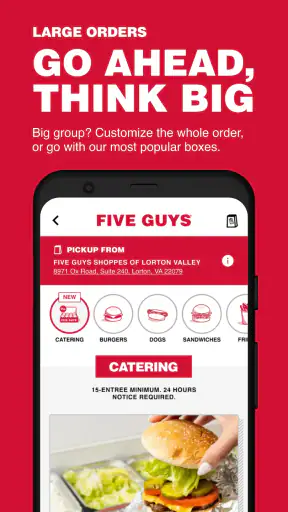
When I want Five Guys without standing in line, I start with Five Guys Burgers & Fries rather than opening a general food-delivery app. This free shopping app is built around ordering from Five Guys on an Android phone, so its purpose is refreshingly narrow: choose a restaurant, build the meal, and send the order through the brand’s own ordering experience.
I found that focus useful when I already knew what I wanted. It avoids the distraction of browsing unrelated restaurants, and the menu is presented in a way that suits Five Guys’ highly customizable burgers, hot dogs, sandwiches, fries, and drinks. The trade-off is just as clear: this is not a universal restaurant marketplace. If I am comparing several nearby places, looking for the cheapest delivery option, or trying to combine orders from different businesses, another app is more practical.
From craving to completed order
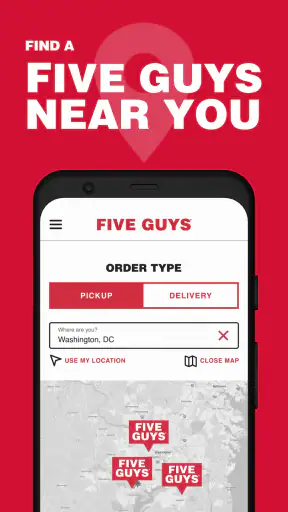
Starting with the right restaurant
The first important decision is whether I want pickup or a delivered meal, where available through the ordering flow. I begin by selecting a Five Guys location rather than treating the app like a general map or restaurant directory. That matters because the selected branch becomes the source of the menu and the destination for the order. A few seconds spent checking the location can prevent the most annoying mistake: customizing a meal and then realizing I started with the wrong restaurant.
Five Guys Franchisor LLC is the developer, and the app has been around since Mar 3, 2011. Its long presence helps explain why the experience feels like a dedicated ordering tool rather than a newly assembled promotional app. It has reached over a million installs, while its 4.3 average from around twelve thousand ratings suggests that many customers find it dependable, even if it is not universally loved.
For a regular customer, the best starting habit is to decide the handoff before touching the menu. If I am passing a restaurant on the way home, pickup makes the most sense. If I am already settled at home, delivery may be more convenient, but I would compare the final total and estimated timing with the usual delivery alternatives before committing. The app is strongest when the restaurant choice is already settled.
Building a meal without losing track
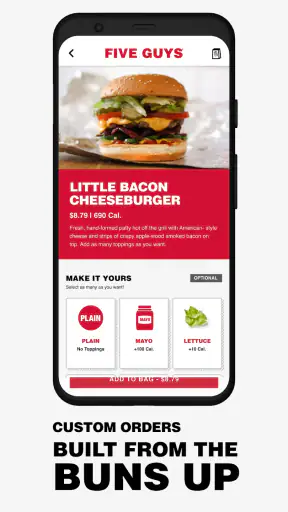
Once the location is chosen, I work through the menu item by item. The main strength here is that Five Guys orders are not just a matter of selecting “burger” and moving on. Toppings and preparation choices are central to the experience, so I slow down enough to check every part of the order before adding it to the basket.
My practical tip is to build one item completely before moving to the next. It is easy to remember the burger correctly but overlook the fries, drink, or a second person’s preferences when ordering for a group. This approach also makes the basket easier to audit. I can ask myself whether each burger has the intended toppings, whether the fry size suits the group, and whether I accidentally added something twice.
The customization is a genuine reason to use the dedicated app instead of relying on a generic delivery menu. A third-party listing may be convenient, but the brand-focused flow puts the Five Guys ordering structure in front of me more directly. That is particularly helpful for someone who has strong preferences about toppings or wants to repeat a familiar combination.
There is a small cognitive cost, though. A broad menu with many choices can make a simple order feel less simple, especially when I am ordering quickly from a phone. I recommend checking the basket immediately after customization rather than assuming the last screen reflects everything I intended. This is one of the most useful habits with the app: treat the basket as a final proof, not merely a payment step.
Reviewing the basket before handing it over
The basket is where the order changes from a collection of choices into a real purchase. I use it to verify the restaurant, items, toppings, quantities, and the selected fulfillment method. This is also the point where I look at the total instead of relying on a rough mental estimate. A highly customized meal can cost more than expected, and delivery-related charges can make the difference between a convenient order and an unnecessarily expensive one.
For a family or office order, I would keep the process organized by adding meals in a consistent sequence: main item first, fries and drinks second, then a final review by person. That creates a simple handoff between the person entering the order and the people who will eat it. If someone else is paying, I would show them the completed basket before submitting, because correcting a topping or quantity after the order is sent is much harder than catching it here.
This is also where the app’s narrow purpose becomes an advantage. I am not navigating unrelated promotions, restaurant categories, or a huge marketplace. The review is about one Five Guys order, so the important details remain visible. On the other hand, the app does not replace the comparison tools found in broader services. I still need to make my own judgment about value, travel time, and whether pickup is preferable to delivery.
The handoff between phone and restaurant
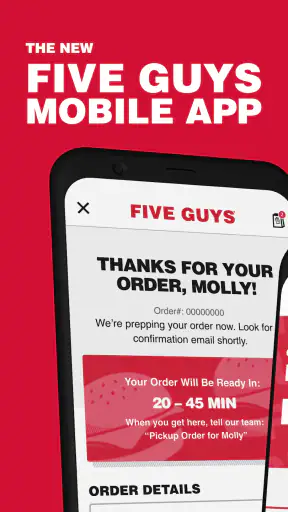
Submitting the order is not the end of the workflow; it is the handoff. My phone passes the selected meal and instructions into the restaurant’s ordering process, and the chosen Five Guys location becomes responsible for preparing it. This is why selecting the correct branch at the beginning matters so much. The app can make entry convenient, but it cannot make an incorrect location convenient.
For pickup, the handoff is relatively direct: I place the order, travel to the selected restaurant, and collect it. The app is most useful in this scenario because it removes the menu discussion from the counter and lets me arrive with the choices already made. I would still leave enough time for preparation and avoid treating the submission screen as a guarantee that the food is ready the instant I reach the door.
For delivery, the chain is longer. The order moves from my phone to the restaurant and then through the delivery arrangement available for that order. More links mean more opportunities for delay or confusion. I therefore use delivery when convenience matters more than absolute control over timing. If I need food at a precise moment, pickup or ordering earlier is the safer decision when practical.
A useful group-ordering habit is to nominate one person as the final checker. Everyone else can send their choices by message, but one person should enter them and read the basket aloud before submission. That reduces duplicated fries, missing toppings, and accidental substitutions. It is a simple workflow improvement that matters more than any individual screen design.
What the result feels like
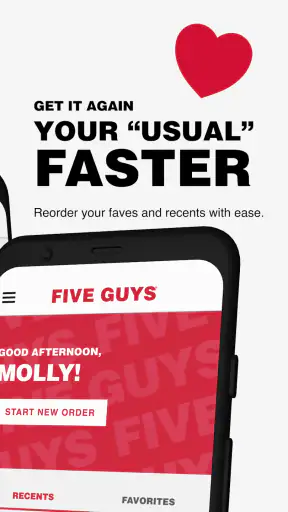
The successful outcome is straightforward: I spend less time ordering at the restaurant and get a Five Guys meal prepared from the choices entered in the app. For a repeat order, the value is mainly convenience and consistency. I can use the same general path each time instead of reconstructing the menu through a search engine or a third-party service.
I also like that the app is free to install and aimed at Everyone, making it approachable for a broad range of customers. Its current version is 5.22.0, and it supports Android 7.0 or later. That older minimum requirement is helpful for people who keep an Android phone for several years, although anyone using an iPhone or an unsupported device will need a different way to order.
The strongest result is not that the app transforms the meal itself. It does not make the food cheaper, shorten every preparation time, or solve every delivery issue. Its role is more practical: it gives me a direct digital route from deciding on Five Guys to sending a detailed order. When that is exactly what I need, the focused design feels appropriate.
Where the flow breaks down
The first weak point is comparison. If I am choosing between Five Guys and several nearby restaurants, I would rather use a marketplace app that shows alternatives in one place. The dedicated app asks me to make the brand decision first, so it is a poor starting point for an undecided meal.
The second is total-cost judgment. The app can help me assemble the order, but I still need to pay attention to the final amount and decide whether the convenience justifies it. A third-party service may offer broader delivery comparisons, while pickup may be better value when I am already nearby. I would not install this app expecting it to function as a price-comparison tool.
The third friction point is customization itself. Choice is valuable, but it creates more opportunities for an overlooked detail. Someone who always orders the same meal will adapt quickly; someone ordering for several people may find the review stage essential. My recommendation is to pause before submission, read each item from top to bottom, and confirm the location and fulfillment method once more.
There is also the question of timing. A phone-based order is convenient, but it does not remove the real-world variables between submission and eating. Restaurant workload, travel, and delivery conditions can still affect the outcome. For a normal meal, that is acceptable. For a tight lunch break or a planned event, I would place the order with more margin or choose pickup if that gives me better control.
Who should use it regularly
I think this app suits repeat Five Guys customers best. If I already know the restaurant I want and appreciate customizing a burger or fries without explaining everything at the counter, the dedicated route is sensible. It is also useful for households where one person regularly places the order for everyone, because the basket provides a central place to check quantities and preferences.
It can work well for a quick pickup after work. I can decide the meal before leaving, send the order while I am still at home or on the way, and arrive with the transaction already organized. The key is to choose the branch carefully and avoid rushing through the customization screens.
I would recommend skipping it if I am mainly looking for discovery, discounts across multiple restaurants, or the broadest delivery coverage. A general food app is better for those jobs. I would also hesitate if I use iOS, because the stated operating-system requirement is for Android and the app is specifically presented as an Android ordering option. In that situation, I would use the ordering method available on my device rather than forcing this particular app into the workflow.
My practical verdict
After using it as a dedicated Five Guys ordering tool, I see Five Guys Burgers & Fries as a focused utility rather than an all-purpose food app. Its value comes from keeping the brand’s menu and customization process close at hand, especially when I have already decided what I want. The free price makes trying it low-risk, and the solid average rating shows that it has earned a generally positive response from its user base.
I would install it for convenient repeat orders, particularly pickup, and I would keep the basket-review habit because it prevents the most realistic mistakes. I would not rely on it for restaurant discovery, broad price comparison, or perfectly predictable delivery timing. The best reason to use it is control over a Five Guys order; the best reason to choose another app is flexibility beyond Five Guys.
That balance makes the recommendation simple. If Five Guys is already the answer, this app gives me a direct path from craving to checkout. If the real question is “which restaurant should I choose?” or “which service gives me the best overall deal?”, I would start elsewhere. For the narrower job it is designed to handle, it is a useful, reasonably mature companion for Android customers.


